

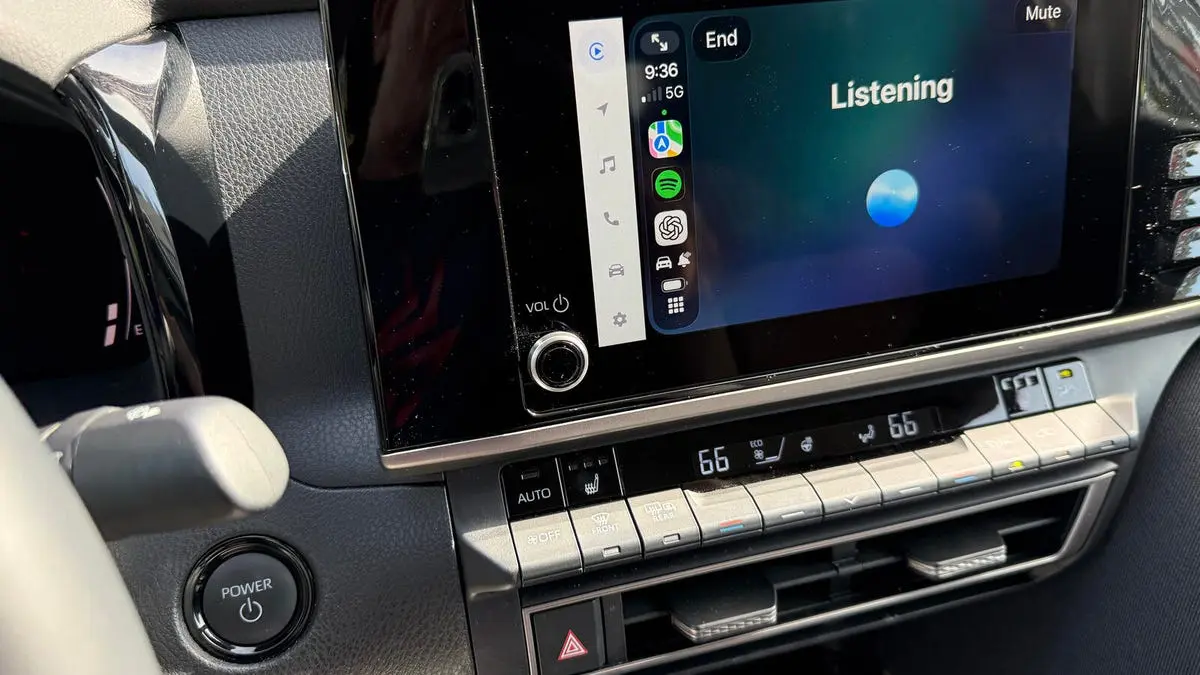
For years, Siri has been the default voice assistant inside my car, handling music playback, navigation, messages, and calls through Apple CarPlay. While it does those tasks reasonably well, it struggles with complex or open-ended questions—exactly the type of queries that modern AI assistants handle effortlessly. Now that Apple has added CarPlay support for third-party voice assistants, I decided to test two of the most prominent ones: ChatGPT and Perplexity AI. Both are accessible directly from the CarPlay dashboard, allowing hands-free voice interaction while driving. In my extensive testing, both assistants made Siri look outdated, but they have distinct strengths and weaknesses.
What you need to get started
To use these AI assistants in CarPlay, you need an iPhone and a vehicle that supports CarPlay (most recent models do). You must install the latest versions of the ChatGPT and Perplexity apps from the App Store, and your iPhone should run iOS 26.4 or later (the version that added third-party AI integration). After connecting your phone to the car wirelessly or via Bluetooth, the apps should appear on the CarPlay screen. If not, you can enable them manually in the CarPlay settings on your iPhone. For ChatGPT, simply tap the icon and select "New voice chat." For Perplexity, tap its icon and then "Connect." Note that Perplexity requires a Pro subscription ($20 per month), while ChatGPT is free for all account types.
Testing methodology
I threw a dozen different tasks at both assistants, covering driving directions, local recommendations, music playback, communication, calendar access, reminders, general knowledge, storytelling, games, language learning, and casual conversation. Each assistant was given similar prompts, and I evaluated their responses based on accuracy, usefulness, and engagement. Here are the results.
1. Provide driving directions
I asked each assistant for driving directions to Faneuil Hall in Boston. ChatGPT could not complete the task because it cannot access my current location. Perplexity, however, requested location permission and then launched Apple Maps with turn-by-turn directions. Perplexity wins this round.
2. Recommend local restaurants
When asked to recommend a local Mexican restaurant, ChatGPT again failed due to location limitations. Perplexity listed several nearby restaurants, asked which one I preferred, and then provided directions. Another win for Perplexity.
3. Play music
Music playback is one of Siri's strong suits, but neither AI could handle it reliably in the car. ChatGPT cannot control music services at all. Perplexity is supposed to work with Apple Music and Spotify, but when I asked it to play a specific song from Spotify via CarPlay, the song appeared in the Spotify app on my iPhone but required manual initiation—defeating the hands-free purpose. Neither assistant performed well here.
4. Communicate with people
Attempting to place a call, send a text message, or send an email, both assistants failed. They lack access to personal contacts and messaging apps. Siri remains the better choice for these tasks.
5. Access my calendar
ChatGPT could not view or add calendar events. Perplexity, on the other hand, was able to read off my existing appointments and even add new ones. Another point for Perplexity.
6. Set a reminder
Similarly, ChatGPT could not create reminders, while Perplexity successfully set one. Perplexity continues to excel in tasks that require integration with iPhone's native apps.
7. Answer a general question
I asked both assistants to explain how the American Civil War started. Both provided accurate and concise answers. This was a tie.
8. Answer a specific question
When I asked for science-fiction novel recommendations from the 1960s, both gave initial lists of about four titles. Perplexity suggested additional books, but ChatGPT's responses were more engaging, describing each book with colorful language and personality. ChatGPT wins this round.
9. Tell me a story
I requested a story about my cat Mr. Giggles landing on the moon. ChatGPT crafted a fun, imaginative narrative full of detail and flair. Perplexity was overly literal, first pointing out that a cat cannot physically travel to the moon, and then delivering a dry, less imaginative story. ChatGPT clearly excelled here.
10. Play a game
Both assistants were able to conduct a trivia quiz, asking multiple questions and scoring my answers. Both performed adequately, resulting in another tie.
11. Help me learn a language
I asked both to help me learn Italian ahead of a trip. They asked which phrases I wanted to practice, then taught me common words and phrases by pronouncing them in Italian and explaining the meaning in English. Both corrected my pronunciation when wrong and praised me when correct. Another tie.
12. Chat with me to pass the time
Feeling bored and tired while driving, I asked each assistant to chat with me to pass the time. ChatGPT engaged in a genuine back-and-forth conversation, adapting to my interests and keeping me entertained. Perplexity mostly recited information without the same conversational flow. ChatGPT took the win.
So, which assistant is the ultimate winner? It depends on your priorities. Perplexity is superior for location-based tasks, calendar access, and reminders—activities that Siri already handles reasonably well. The true value of a third-party AI in CarPlay lies in its ability to answer complex questions, tell stories, play games, and hold conversations—areas where Siri falls short. In those creative and conversational tasks, ChatGPT consistently outperformed Perplexity. You can always use both, as the CarPlay dashboard allows switching between them. But when I'm driving alone and need an engaging companion to pass the time, I will reach for ChatGPT. Its natural dialogue and imaginative responses make long journeys far more pleasant.
Source: ZDNET News