

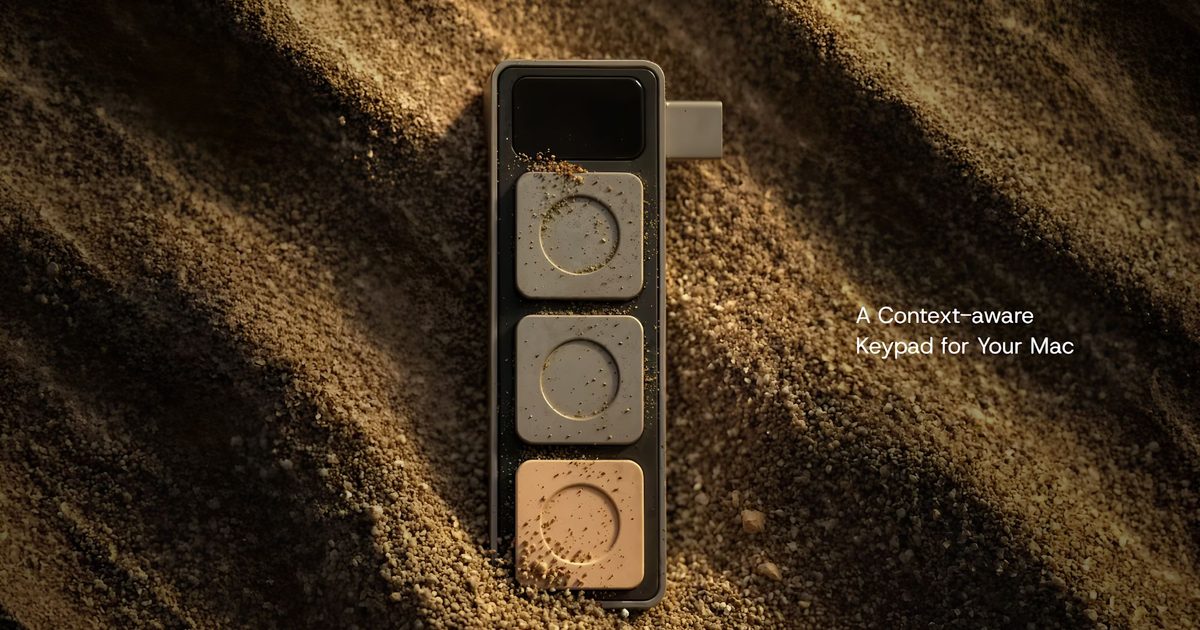
A new hardware accessory is looking to simplify one of the more frustrating aspects of using a MacBook: juggling different keyboard shortcuts across video calls, productivity apps, and development tools. The startup Project Mirage has launched Dune, a compact USB-C accessory that adds three programmable buttons to compatible MacBooks. The device dynamically changes its functions depending on the application currently in use, allowing users to perform common actions with a single press instead of memorizing different keyboard shortcuts for each program.
The concept of dedicated macro keypads is not new, with devices like the Elgato Stream Deck having popularized customizable button pads for streamers and productivity enthusiasts. However, Dune differentiates itself by being designed specifically for MacBooks, engineered to sit flush against the side of the laptop. It draws power directly from the host MacBook's USB-C port, eliminating the need for separate batteries or charging cables. This low-profile design ensures the accessory adds minimal bulk, making it suitable for users who frequently travel or work in tight spaces.
Context-aware controls for every workflow
Unlike traditional macro keypads that require manual profile switching, Dune automatically detects the active application and adjusts its button assignments accordingly. For instance, during a Zoom or Google Meet session, the three buttons can be configured to mute the microphone, toggle the webcam on and off, or bring the meeting window into focus. In spreadsheet tools like Microsoft Excel or Google Sheets, they can become copy, paste, and undo shortcuts. Developers using Visual Studio Code or GitHub can assign actions such as commit, push, or run a script. This context-awareness reduces friction, as users do not need to remember which button does what in different contexts.
AI-powered customization with Claude Desktop
One of Dune's standout features is its integration with Anthropic's Claude Desktop, an AI assistant. Instead of manually writing automation scripts—which can be daunting for non-programmers—users can describe the desired shortcut in natural language. For example, a user could say, "Every time I press this button, open Slack, type 'Good morning team,' and send it." Claude will then generate the necessary Python code and assign it to the selected button. This makes creating custom workflows considerably more approachable and opens up advanced automation possibilities for a broader audience.
The companion app, which ships with every Dune unit, also integrates with the Mac's calendar. It surfaces upcoming meetings and allows users to quickly join a call, dismiss reminders, or send a "running late" message with a single press. This kind of deep integration bridges the gap between hardware shortcuts and digital calendars, a combination not commonly found in competing products.
Hardware specifications and compatibility
Currently, Dune is compatible with MacBook Air models powered by the M2 chip or newer, and MacBook Pro models featuring M1 Pro processors or later. It requires macOS Sequoia 15 or newer. The device is precision-molded to match the contours of these specific laptops, ensuring a snug fit that does not wobble or obstruct other ports. The three buttons are mechanical and offer tactile feedback, making them suitable for rapid, repeated presses. Project Mirage states that the device is built to last and that the companion app will receive regular updates to expand compatibility and add new features.
In terms of pricing, Dune is currently available at an introductory price of US$119, after which it will retail for US$149. This places it in a competitive range compared to larger macro pads like the Stream Deck Mini ($79.99) but offers the advantage of seamless integration with the MacBook's design and macOS ecosystem.
Potential use cases and target audience
While Dune will likely appeal to power users—developers, video editors, graphic designers, and remote workers—its AI-assisted customization means even casual users can benefit. For example, a student could configure one button to open their learning management system, another to toggle dark mode, and a third to paste a frequently used snippet of text. The device's ability to adapt to different apps means that a photographer could set shortcuts for Lightroom adjustments, while a project manager could use it to switch between Jira boards and Slack channels.
Another compelling scenario is accessibility. For users with motor impairments or those who find reaching for the keyboard uncomfortable, having three large, always-available buttons that can perform complex sequences could reduce strain and improve efficiency.
Competitive landscape and market positioning
The market for programmable macro keypads is varied, ranging from affordable one-button foot pedals to elaborate 32-button decks. Stream Deck remains the most recognized brand, but its devices are often designed for desktop use and require separate driver software to manage profiles. Dune's approach of automatic, app-detected switching differentiates it by removing the need for manual profile changes. Additionally, its physical integration with the MacBook body means it won't clutter a desk or get lost in a bag.
Other competitors include the Loupedeck series (targeted at creative software) and smaller DIY options. However, no other device in this price bracket currently offers native AI script generation through Claude Desktop. This partnership gives Dune a unique edge in the productivity hardware space, especially as AI tools become more mainstream.
Technical challenges and considerations
While context-aware switching is convenient, it also raises potential issues. For instance, if a user has two windows of different apps open simultaneously, Dune must decide which app's profile to load. According to Project Mirage, the device prioritizes the active (frontmost) window. However, on macOS, the active window may not always correspond to the user's intention—especially when using multiple monitors or full-screen apps. The company has stated that future updates to the companion app may allow manual overrides or per-window configurations.
Another consideration is the need for macOS Sequoia 15 or newer. This restricts Dune's addressable market to users on relatively recent operating systems. Older Macs or those running earlier versions of macOS will not work with the device. Additionally, since Dune draws power from the USB-C port, users with limited ports (like the MacBook Air with only two ports) may need to sacrifice an additional accessory or use a hub.
Security is also a factor: the device executes local Python scripts generated by an AI. While Claude Desktop runs on the user's machine and does not send arbitrary data to the cloud, users concerned about automation permissions must ensure they trust the generated code. Project Mirage says the companion app sandboxes scripts, preventing them from accessing system-critical components without explicit user approval.
Future outlook and potential evolution
As AI-assisted productivity tools continue to expand beyond software and into the physical world, devices like Dune suggest a new category of hardware is emerging: context-aware, AI-powered peripherals that learn and adapt to user behavior. The success of Dune will depend on how well Project Mirage expands its library of app-specific profiles and how quickly it can add support for more applications through community contributions or AI training. The company has also hinted at future versions with more buttons, wireless connectivity, and perhaps a cross-platform version for Windows and Chromebooks.
In the meantime, early adopters can explore the possibilities of a compact, integrated button pad that aims to make everyday computer interactions faster and more intuitive. Whether the concept catches on will likely depend on how valuable users find its growing library of customizable shortcuts and automations, and how well the AI-assisted workflow creation tool performs in practice.
For now, Dune presents a thoughtful, design-conscious solution to a common problem faced by MacBook users: the inefficiency of navigating complex keyboard shortcuts. By combining hardware that sits flush against the laptop with software that understands context and leverages AI for setup, Project Mirage is betting that small, dedicated physical controls still have a place in an increasingly touch-based and voice-controlled computing landscape. Only time will tell if this bet pays off, but the immediate availability at a reasonable price point makes it an attractive experiment for anyone looking to shave seconds off repetitive tasks.
Source: Digital Trends News