

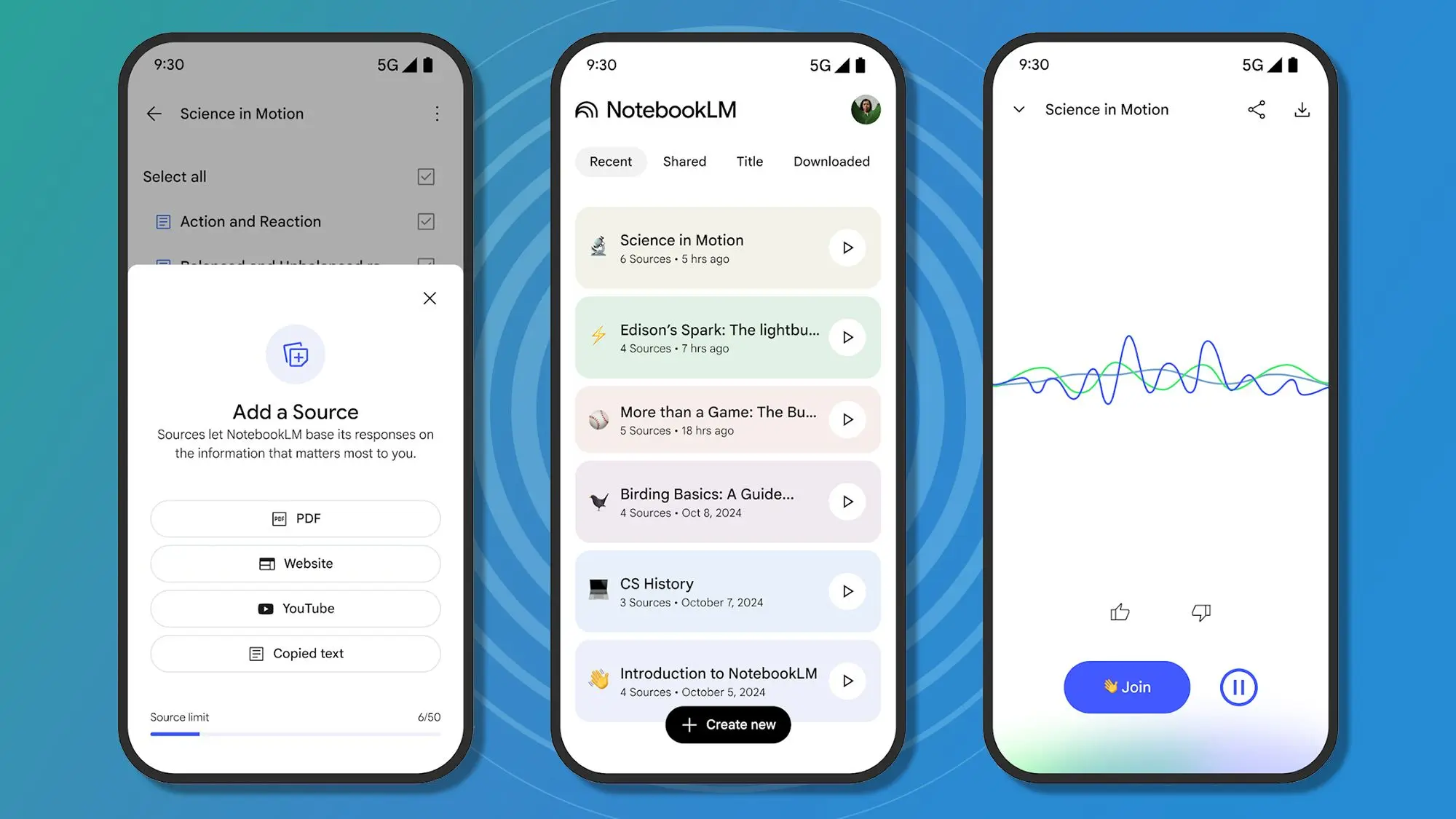
When Google launched NotebookLM in 2023, many dismissed it as just another experimental AI notebook—a place to dump notes and get a few automated summaries. But after using it for months, I have discovered that it is far more than a research assistant. It has become the central hub for my work, learning, and even personal life organization.
What is Google NotebookLM?
NotebookLM (short for Notebook Language Model) is an AI-powered note-taking application that allows users to upload documents—PDFs, Google Docs, web pages, and even YouTube videos—and then ask questions about that content. Unlike generic chatbots, it grounds its answers strictly in the sources you provide, preventing hallucinations and ensuring accuracy. It was initially pitched as a tool for students and researchers, but its potential extends far beyond academia.
From Research Tool to Life Organizer
My journey with NotebookLM began during a chaotic semester of graduate school. I needed to synthesize dozens of research papers for a thesis on machine learning ethics. I uploaded them into NotebookLM and was amazed at how quickly it could produce summaries, compare arguments, and even suggest connections I had missed. But soon, I started uploading lesson plans, meeting notes, and even personal reading lists. The AI helped me extract action items from meeting transcripts, summarize long emails, and even generate study guides for professional certifications.
What makes NotebookLM different is its ability to treat every piece of information as a source that can be queried. You can create multiple notebooks, each with its own set of sources, and switch between contexts instantly. For example, I have a notebook for work projects, another for personal finance research, and one for hobbyist cooking recipes. The AI never confuses the domains because it only accesses the sources you assign.
Key Features That Transformed My Workflow
Source-Grounded Answers
Unlike generic AI assistants like ChatGPT, NotebookLM will not invent facts. When you ask a question, it scans your uploaded documents and provides responses with direct citations. This is invaluable for tasks like contract review, legal research, or verifying product specifications. I use it to cross-reference technical documentation and highlight inconsistencies in vendor proposals.
Study Guides and Audio Overviews
One of the most innovative features is the ability to generate an Audio Overview—a podcast-like discussion between two AI hosts that summarizes your notes and sources. Listen to it while commuting or exercising. The AI can even create a study guide with key terms, questions, and summaries tailored to your uploaded materials. This turns dense PDFs into digestible learning sessions.
Notebook Management and Organization
You can organize sources into notebooks with custom titles and descriptions. Each notebook functions as a separate AI assistant that knows only about its own sources. For personal life, I have a notebook called «Home Management» where I upload insurance documents, appliance manuals, and utility bills. I ask it questions like «When is my car insurance due?» or «What is the warranty for my refrigerator?» and get precise answers pulled straight from the documents.
Practical Applications Beyond Research
Project Management
I now use NotebookLM for every project kickoff. I upload the project charter, meeting notes, email threads, and technical specs. The AI helps me create Gantt charts, identify risks, and generate status reports. Before a stakeholder meeting, I ask it to summarize recent progress and flag pending decisions. It reduces my preparation time from two hours to fifteen minutes.
Personal Finance and Tax Prep
During tax season, I upload all my receipts, bank statements, and investment reports into a dedicated notebook. NotebookLM helps me categorize expenses, calculate deductions, and even answer questions about capital gains. It also reminds me of deadlines by scanning my documents for date references.
Learning New Skills
I am currently learning Italian. I upload grammar guides, vocabulary lists, and transcripts of podcasts. The AI generates personalized quizzes, explains grammar rules in context, and even practices conversational scenarios by role‑playing based on the materials. It is like having a tutor that knows exactly what you have studied.
Travel Planning
Before a recent trip to Japan, I uploaded travel guides, airline policies, hotel confirmations, and a list of must‑see attractions. NotebookLM created a daily itinerary, packed a checklist of essentials, and even answered questions about local customs. During the trip, I used it offline on my phone to recall restaurant recommendations and train schedules.
Tips for Getting the Most Out of NotebookLM
- Curate your sources carefully. The quality of answers depends on the documents you upload. Remove duplicates and irrelevant files.
- Use descriptive source names. When you upload a file, rename it to something meaningful so you can easily find it later.
- Ask specific questions. Instead of «Tell me about this document,» ask «What are the key action items from the meeting notes dated January 15?»
- Combine with other tools. Use NotebookLM for synthesis and deep research, then export key insights to your task manager or calendar.
- Explore the Audio Overview feature. It is surprisingly effective for learning during commutes or while doing chores.
The Future of Personal Knowledge Management
Google continues to iterate on NotebookLM, adding features like support for more file types, integration with Google Drive, and collaboration tools. As AI models improve, we can expect even deeper analysis—maybe even the ability to draw insights across multiple notebooks or learn your personal preferences. For now, NotebookLM remains a free tool (as of 2025) that anyone can use with a Google account. If you haven't tried it beyond basic note‑taking, I encourage you to experiment. Upload a few weeks of emails, a project plan, or a stack of research papers. Ask it unexpected questions. You might be surprised at how quickly it becomes an indispensable part of your daily routine.
Source: TechRadar News